
macOS · Windows · Linux

화면을 읽는 AI가
있는 터미널
The terminal with an AI that reads your screen

현재 터미널 출력을 그대로 이해하는 AI 어시스턴트, 원클릭 SSH 접속, 드래그로 끝나는 SFTP 전송. 셸·원격·파일·AI를 한 창에서. An AI assistant that understands what's on your screen, one-click SSH, and drag-and-drop SFTP — your shell, remote servers, files, and AI in a single window.
macOS· Windows· Linux· 오픈소스 (MIT)Open source (MIT)· 무료Free
ssh:prod-west-2 — focus pane navy · teal
$ sudo systemctl restart nginx Job for nginx.service failed because the control process exited. See "journalctl -xe" for details. Active: failed (Result: exit-code)
ASSISTANT nginx 설정에 문법 오류가 있어 보입니다. nginx -t로 정확한 위치를 확인하세요. 포트 80이 점유 중이면 lsof -i :80도 함께 보면 좋습니다.Looks like a syntax error in your nginx config. Run nginx -t to find the exact line. If port 80 is taken, check lsof -i :80 too.
$ nginx -t
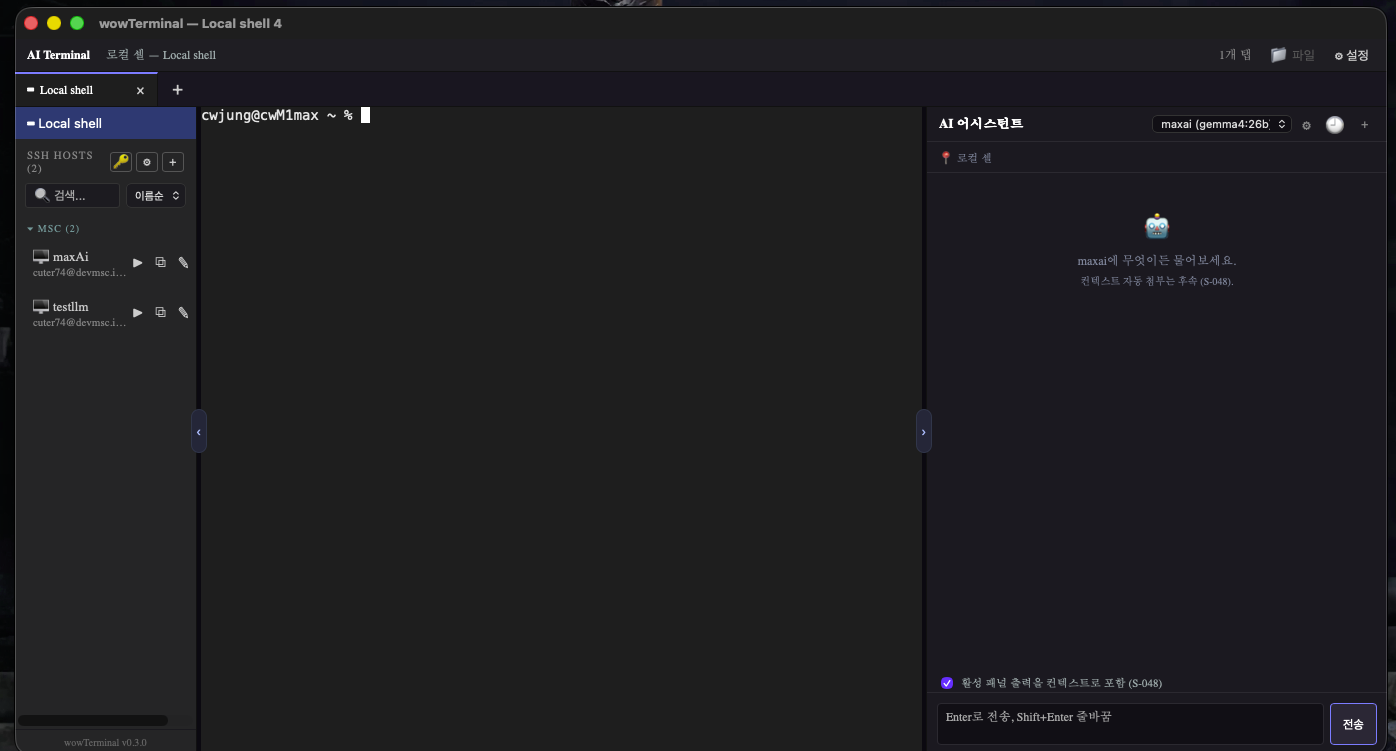
wowTerminal — SSH hosts on the left, a local shell in the center, and the AI assistant on the right, all in one window.
◧ SSH 호스트 패널 · 좌측◧ SSH hosts · left ▭ 로컬 셸 · 탭 · 분할 · 가운데▭ Shell · tabs · splits · center ◨ AI 어시스턴트 · 우측◨ AI assistant · right
Why wowTerminal

핵심 가치Why it feels different

01

컨텍스트를 아는 AIContext-aware AI

포커스된 터미널의 최근 출력을 AI가 함께 봅니다. 에러 메시지든 명령 결과든, 화면 그대로를 이해하고 답합니다.The assistant sees the focused pane's recent output — it answers about your actual errors and results, not generic guesses.

02

하나의 창, 네 가지 일One window, four jobs

로컬 셸, SSH 원격, SFTP 파일 전송, AI 채팅을 탭과 분할로 한 번에.Local shells, SSH sessions, SFTP transfers, and AI chat — together in tabs and split panes.

03

빠르고 네이티브Fast & native

Rust(Tauri 2) + xterm.js. 가벼운 네이티브 앱으로 빠르게 뜨고 빠르게 돕니다.Built on Rust (Tauri 2) and xterm.js — a lightweight native app that launches fast and stays responsive.

Use Cases

이런 상황에서 씁니다Made for real workflows

원격 서버 디버깅Remote server debugging

BEFORE에러 발생 → 다른 창 열어서 AI에 복붙Error hits → open another window, copy-paste into an AI
AFTER같은 창에서 AI가 에러를 보고 즉시 해설The in-app AI reads the error and explains it instantly
SSHAI

SFTP 배포SFTP deploys

BEFORECLI로 scp 명령 타이핑Type out scp commands in the CLI
AFTER드래그 & 드롭으로 원격 서버에 업로드Drag & drop to upload to the remote server
SFTPdrag & drop

팀 서버 목록 공유Sharing the team's servers

BEFORE스프레드시트·메모장으로 서버 정보 관리Track server info in spreadsheets and notes
AFTER앱 내 그룹·태그 + 내보내기/가져오기In-app groups & tags with import/export
SSH 매니저SSH managerexport
assistant — streaming
$ docker compose up -d Error: port 5432 is already allocated
ASSISTANT 다른 컨테이너가 PostgreSQL 포트를 점유하고 있습니다. docker ps로 확인 후 충돌하는 컨테이너를 멈추거나 포트를 바꾸세요.Another container already holds the PostgreSQL port. Check with docker ps, then stop the conflicting container or change the port.
$ docker ps --filter publish=5432
AI Assistant

여러 백엔드, 실시간 스트리밍Multiple backends, live streaming

  • OpenAI 호환 엔드포인트라면 무엇이든 — OpenAI, Ollama(로컬), vLLM, TGI, 자체 게이트웨이.Connect any OpenAI-compatible endpoint — OpenAI, Ollama (local), vLLM, TGI, or your own gateway.
  • 응답이 토큰 단위로 실시간 스트리밍되어 기다림이 짧습니다.Responses stream token by token, so there's barely any waiting.
  • 답변 속 명령어는 카드 + ‘터미널로 보내기’ 버튼으로 한 번에(엔터는 직접).Commands in replies become cards with a “Send to terminal” button (you press Enter).
  • 탭마다 독립된 대화, 저장되는 이력, 창 분리 시 대화도 함께 인계.Per-tab conversations, saved history, and handover when you detach a tab.

백엔드 지원Backends

OpenAI Ollama vLLM TGI Self-hosted
SSH Manager — hosts
▸ production 3 hosts api-west-2 10.0.4.12 :22 deploy db-primary 10.0.4.30 :22 ops worker-01 10.0.4.41 :22 deploy ▸ staging 2 hosts # known_hosts verified · TOFU double-click → new tab ▶ → current tab
SSH Manager

호스트·키·보안을 한곳에Hosts, keys & security

  • 호스트 프로필(이름/주소/포트/유저/인증), 그룹·태그, 검색·정렬.Host profiles (name, address, port, user, auth), groups & tags, search and sort.
  • SSH 키 생성·가져오기. 비밀번호는 OS 보안 저장소 또는 암호화 파일에(평문 저장 안 함).Generate or import SSH keys. Secrets live in the OS keychain or an encrypted file — never plaintext.
  • TOFU 호스트키 검증(known_hosts) — 키 불일치 경고로 중간자 공격 방어.Trust-on-first-use host-key verification (known_hosts), with mismatch warnings to guard against MITM.
  • 더블클릭=새 탭 / ▶=현재 탭 / 우클릭 메뉴 / 키보드 복제·삭제.Connect via double-click (new tab), ▶ (current tab), right-click menu, or keyboard.
SFTP — local ↔ remote
Local · ~/build
dist/
app.tar.gz8.4M
.env1.2K
deploy.sh640B
Remote · /var/www
releases/
shared/
current→ rel
app.tar.gz → /var/www/releases68%
SFTP Browser

드래그로 끝나는 파일 전송Transfers end with a drag

  • 로컬 ↔ 원격 이중 패널. OS 파일을 드래그해 업로드, 폴더 선택으로 다운로드.Dual local ↔ remote panes. Drag OS files in to upload, pick a folder to download.
  • 패널 사이 항목을 직접 드래그해 전송. 진행률 바 + 동시 전송 큐.Drag items between panes to transfer. Progress bars and a concurrent transfer queue.
  • 원격 파일 검색, Unix 권한 편집.Remote file search and Unix permission editing.
zsh ssh: api logs +
$ npm run dev VITE ready in 312 ms ➜ localhost:5173
$ tail -f app.log 12:04:02 GET /api/health 200 12:04:05 GET /api/me 200
Terminal Core

탭 · 분할 · 창 분리Tabs, splits & detach

  • PTY 기반 실제 셸, xterm.js 렌더링. 한글(IME) 입력 지원.Real PTY-backed shells rendered with xterm.js, with Korean/CJK IME input.
  • 탭, 좌우/상하 분할, 탭을 떼어 새 창으로 분리(세션·화면 그대로 인계).Tabs, horizontal/vertical splits, and detach a tab into its own window (live session handed over).
  • 히스토리 검색(Ctrl/⌘+R), 인라인 자동완성(Tab), 더블클릭 이름 변경.History search (Ctrl/⌘+R), inline autocomplete (Tab), double-click to rename tabs.
UI & more

마무리 디테일The details that add up

11개 UI 언어11 UI languages

OS 로케일 자동 감지로 첫 실행부터 모국어.Auto-detected from your OS locale — your language from first launch.

English한국어Español 中文日本語Русский FrançaisDeutschTiếng Việt Indonesiaहिन्दी

테마 & 레이아웃Theme & layout

좌측 호스트 패널·우측 AI 패널 접기/펴기 + 폭 드래그. 폰트·스크롤백 설정.Collapsible host (left) and AI (right) panels with draggable widths. Font & scrollback settings.

$ dark theme
navy · slate
$ light theme
slate · ink

앱 내 자동 업데이트In-app auto-update

새 버전이 나오면 버전 옆 배지로 알리고 클릭 한 번에 설치. 호스트/그룹/태그 내보내기·가져오기.A badge appears for new versions; one click installs. Import/export of hosts, groups, and tags.

v0.3.0 → 최신latest one-click install
Trust & Security

비밀은 평문으로 저장하지 않습니다Your secrets are never stored in plaintext

$

API 키·SSH 개인키·비밀번호는 OS 키체인 또는 머신 키로 암호화한 파일에 보관.API keys, SSH private keys, and passwords live in the OS keychain or a machine-key-encrypted file.

호스트/그룹/태그 내보내기에는 시크릿이 포함되지 않습니다.Exports of hosts/groups/tags exclude all secrets.

SSH 접속은 known_hosts로 호스트키를 검증(TOFU).SSH connections verify host keys via known_hosts (TOFU).

</>

오픈소스(MIT) — 코드를 직접 확인할 수 있습니다.Open source (MIT) — inspect the code yourself.

For developers

기술 스택Built on a fast, honest stack

MIT License macOS / Windows / Linux Self-hostable AI
Backend
Rust + Tauri 2
Frontend
React 19 + TS + Vite
Terminal
xterm.js + portable-pty
SSH / SFTP
russh + russh-sftp
Secrets
Keychain / AES-256-GCM
Download

지금 다운로드Get wowTerminal v0.3.0

최신 릴리스 v0.3.0. 모든 빌드는 GitHub Releases에서 받습니다.
Windows .msi · Linux .deb · .rpm 패키지도 제공됩니다.
The latest release, v0.3.0 — every build comes from GitHub Releases.
Windows .msi and Linux .deb / .rpm packages are also available.

macOS Apple Silicon · .dmg · 9.1 MB macOS Intel · .dmg · 9.5 MB Windows x64 installer · .exe · 6.3 MB Linux x64 · .AppImage · 83 MB
!

현재 미서명 빌드 안내Unsigned builds — heads-up

현재 빌드는 코드 서명 전이라 첫 실행 시 OS 경고가 나올 수 있습니다.Builds are currently unsigned, so your OS may warn on first launch.

macOS우클릭 → 열기Right-click → Open
Windows“추가 정보 → 실행”SmartScreen: More info → Run anyway
FAQ

자주 묻는 질문Frequently asked questions

네, 오픈소스(MIT)이며 무료입니다.Yes — open source (MIT) and free.
OpenAI 호환 API라면 무엇이든. 로컬 Ollama, 자체 호스팅 게이트웨이 포함.Any OpenAI-compatible API, including local Ollama and self-hosted gateways.
평문 저장하지 않고 OS 키체인 또는 암호화 파일에 보관합니다.Never stored in plaintext; kept in the OS keychain or an encrypted file.
macOS·Windows·Linux 모두 지원합니다.macOS, Windows, and Linux are all supported.
11개 언어 UI를 제공하며 OS 로케일을 자동 감지합니다.11 UI languages, auto-detected from your OS locale.