 wowTerminal
컨텍스트를 아는 AIContext-aware AI
포커스된 터미널의 최근 출력을 AI가 함께 봅니다. 에러 메시지든 명령 결과든, 화면 그대로를 이해하고 답합니다.The assistant sees the focused pane's recent output — it answers about your actual errors and results, not generic guesses.
현재 터미널 출력을 그대로 이해하는 AI 어시스턴트, 원클릭 SSH 접속, 드래그로 끝나는 SFTP 전송. 셸·원격·파일·AI를 한 창에서. An AI assistant that understands what's on your screen, one-click SSH, and drag-and-drop SFTP — your shell, remote servers, files, and AI in a single window.
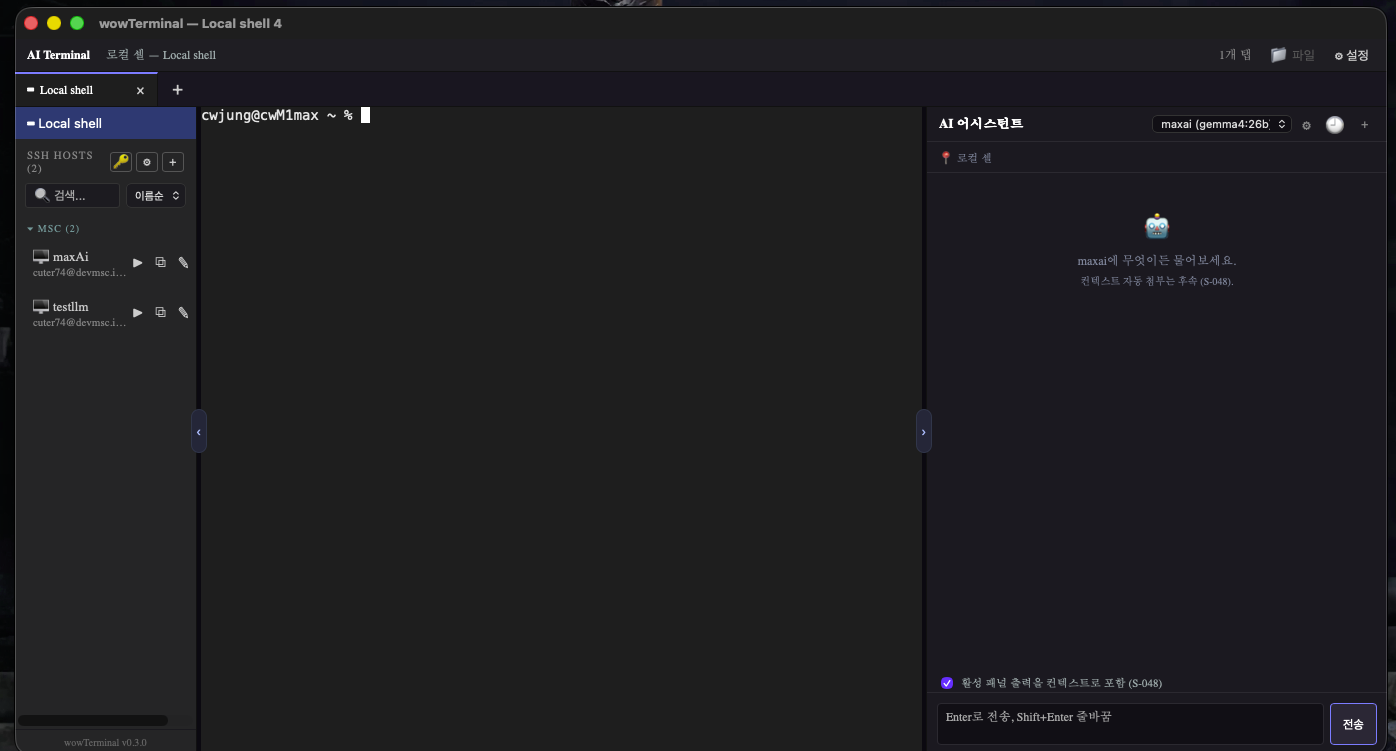
포커스된 터미널의 최근 출력을 AI가 함께 봅니다. 에러 메시지든 명령 결과든, 화면 그대로를 이해하고 답합니다.The assistant sees the focused pane's recent output — it answers about your actual errors and results, not generic guesses.
로컬 셸, SSH 원격, SFTP 파일 전송, AI 채팅을 탭과 분할로 한 번에.Local shells, SSH sessions, SFTP transfers, and AI chat — together in tabs and split panes.
Rust(Tauri 2) + xterm.js. 가벼운 네이티브 앱으로 빠르게 뜨고 빠르게 돕니다.Built on Rust (Tauri 2) and xterm.js — a lightweight native app that launches fast and stays responsive.
max, OpenAI의 minimal 등 제공자별 단계도 사용 가능.A 🧠 dropdown in the AI panel overrides the reasoning effort per session — auto (use the backend setting) or minimal/low/medium/high/max. Values pass through verbatim, so provider-specific levels like GLM's max or OpenAI's minimal work too.passwd prompts are never recorded in the command history or inline autocomplete (Ctrl+R included). The terminal detects password prompts in the output and automatically excludes that input line from history and suggestions.tmux new -A로 그 세션에 연결. 끊겨도 작업은 그대로.Per-host auto-attach — set a tmux session name on a host and every connection lands in it via tmux new -A. Disconnects never lose your work.세션 · 호스트로 표시되고, tmux 창 제목(OSC 0/2)도 실시간 반영.Tab labels sync automatically — attaching labels the tab session · host, and tmux window titles (OSC 0/2) flow into it live.OS 로케일 자동 감지로 첫 실행부터 모국어.Auto-detected from your OS locale — your language from first launch.
좌측 호스트 패널·우측 AI 패널 접기/펴기 + 폭 드래그. 폰트·스크롤백 설정.Collapsible host (left) and AI (right) panels with draggable widths. Font & scrollback settings.
새 버전이 나오면 버전 옆 배지로 알리고 클릭 한 번에 설치. 설정·호스트·그룹·태그·LLM 백엔드 설정을 JSON 파일로 내보내기·가져오기 (API 키는 키체인에 보관되어 내보내기에 포함되지 않음).A badge appears for new versions; one click installs. Export/import settings, hosts, groups, tags, and LLM backend configurations as a JSON file (API keys stay in the keychain and are excluded from exports).
API 키·SSH 개인키·비밀번호는 OS 키체인 또는 머신 키로 암호화한 파일에 보관.API keys, SSH private keys, and passwords live in the OS keychain or a machine-key-encrypted file.
호스트/그룹/태그 내보내기에는 시크릿이 포함되지 않습니다.Exports of hosts/groups/tags exclude all secrets.
SSH 접속은 known_hosts로 호스트키를 검증(TOFU).SSH connections verify host keys via known_hosts (TOFU).
오픈소스(MIT) — 코드를 직접 확인할 수 있습니다.Open source (MIT) — inspect the code yourself.
iPad 앱이 App Store에 출시됐습니다. Android 태블릿(Google Play)은 준비 중입니다. (휴대폰은 지원하지 않습니다.)The iPad app is out on the App Store. Android tablets (Google Play) are coming soon. (Phones are not supported.)
최신 릴리스 v0.21.2. 모든 빌드는 GitHub Releases에서 받습니다.
Windows .msi · Linux .deb · .rpm 패키지도 제공됩니다.
The latest release, v0.21.2 — every build comes from GitHub Releases.
Windows .msi and Linux .deb / .rpm packages are also available.
macOS 빌드는 Developer ID로 서명·공증되어 Gatekeeper 경고가 없습니다. Windows는 현재 코드 서명 전이라 SmartScreen 경고가 나올 수 있습니다.macOS builds are Developer ID-signed and notarized — no Gatekeeper warning. Windows builds are currently unsigned, so SmartScreen may warn on first launch.